Summarsky
Summarizes an ebook chapter by chapter, tracks its characters and settings, and puts all of it in one reader.
What it does
You upload an ebook. Summarsky summarizes each chapter and keeps the structure of the book. It also tracks the characters and the settings in each chapter.
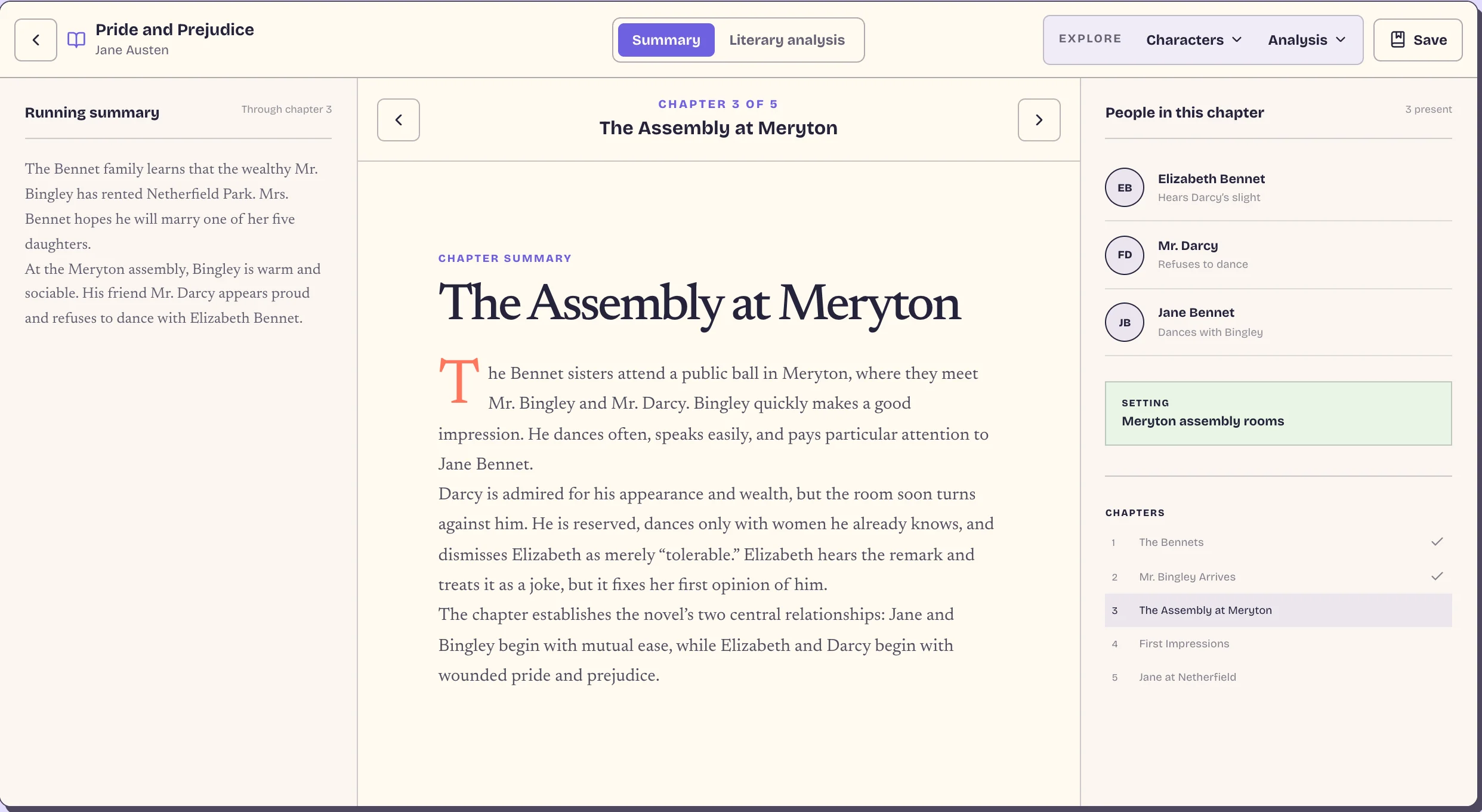
The reader has three columns. The running summary of the book so far is on the left. The current chapter is in the center. The characters, the settings and the chapter list are on the right.
A second mode shows literary analysis instead of summaries: motifs, character arcs, and style and structure.
Inputs
Summarsky accepts 7 file formats: EPUB, DOCX, ODT, RTF, HTML, Markdown and plain text. Pandoc converts the other formats to EPUB before the processing starts.
A book can be public or private. Public books go into a library that anyone can read. Each public book has pages for the chapter summaries, the chapter analysis, and each character. These pages also bring search traffic.
There are also exam pages for IB Paper 2, AP Literature Question 3, and the AQA GCSE set texts.
How it works
The web app takes the upload and puts a job in a BullMQ queue. A separate worker does the processing.
The diagram shows every model call for one book. The worker runs two jobs at the same time. The book job makes the summaries. The analysis job starts with it and analyzes each chapter when its summary is done.
Each call uses one of five model slots: default, title audit, classifier, analysis and exam. The slots are set in the config, so I can change the model for one step without changing the others. The title audit and the classifier use the analysis model if their slot is empty, and the analysis uses the default model.
Before the summaries
- The worker downloads the source file and converts it to EPUB if necessary.
- It extracts the chapters and the metadata: authors, identifiers and subjects.
- It does not trust the metadata. Many uploads have a title such as
5574a3ac878561ba, or fields that are wrong. A model reads the first part of the book together with the metadata, and returns the title, the authors and the other fields. It returns null for a field that it does not know. - A model checks the chapter list and makes the chapter titles clean.
- A classifier reads the first 15,000 characters of each chapter, in parallel, and decides if the chapter has narrative content. The chapters without it are skipped, and the remaining chapters are numbered again.
Summaries
The chapters are summarized in order, one at a time. A book does not fit in one context window, so Summarsky keeps a running summary. Each chapter call gets the running summary so far and the chapter text. It returns the chapter summary and an addition to the running summary. The reader shows the running summary up to the current chapter, so it never shows what happens later.
A second call on the same chapter, in parallel, extracts the characters and the settings.
The chapter text is the first block of every prompt, and the instructions for each step come after it. Thus the summary call, the character call and the repair calls for one chapter share the same prefix, and the provider caches it.
Each chapter stores a snapshot of the running summary. A failed job continues from the last finished chapter.
Literary analysis
The literary analysis is a separate job. For each chapter, two calls run in parallel. One writes the analysis and continues a running trajectory of the book. The other returns structured signals: motifs and the changes to each character. After the last chapter, code merges the signals, and a model writes the motifs and character arcs for the whole book.
When the analysis is done, the worker deletes the chapter text. The exam pages (IB Paper 2, AP Literature Question 3, AQA GCSE) are made from the summaries and the analysis, not from the text.
Model output
Every model output is untrusted. The summary steps return XML, with the characters as JSON inside it. A failed parse first goes through jsonrepair if it is JSON. Then the model gets its previous output, the validation error and the location of the error, and tries again, up to 3 times. Every step has a panic value. The model returns it when a faithful output is not possible, for example when a chapter contains only the letter "I". Then a second pass reconsiders the chapter before the job fails.
Duplicates
Many users upload the same book. When a user selects a file, Summarsky compares it with the public library before the upload. It scores the title, the identifiers such as the ISBN, the authors and the subjects. For a high-confidence match, the user can read the existing book. If the new file has metadata that the library book does not have, Summarsky fills the missing fields.
Usage
The usage limit counts "book units". A long book uses more units than a short book. Units come from a monthly plan or from packs that do not expire.
Pipeline versions
The model output changes when I change a prompt. Old books keep the old output. Thus each book records the version of the pipeline that made it.
At first, the worker deleted the source file after it extracted the chapters, so an old book could not be processed again. In May 2026, I started to keep the source files. For the books from before, an admin uploads an archive of source files. Each file is matched to its book with the same scoring as the duplicate check. A clear match attaches automatically. A close call goes to review.
An admin tool then migrates old books to the current version. It asks for a confirmation code before it starts.